

*The Bootstrap App feature posts will explore applications that are extremely cost efficient, most of the time free to use, that can help you get started on any undertaking, whether it be for personal improvement or entrepreneurial pursuits.
The Apple Reminders App is a great tool that lets you keep your task list handy at all times. It also has a little more functionality than your regular old paper list. It’s great on-the-go and as long as you are good about not forgetting your cellphone, you should never forget your lists again! (maybe not the best for those who like to forget their honey-do-lists at home), Anyways, here is a quick and simple guide to get you started:
- The Apple Reminders App icon looks like a tiny list with colorful bullet points:
2. After selecting this App, you will see all of your created lists. You simply just select any of your previously created lists to access:
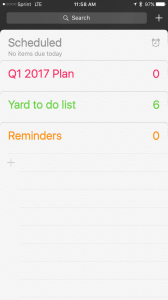
3. To create a new list, you would click on the ‘+’ sign. It is located under the bottom list in your list selection screen (in this example, it is located under my ‘Reminders’ list). This will then give you an option to create either a ‘Reminder’ or ‘List’. The main differences are some of the functionality. I choose lists most of the time because you can still set up reminders within your list for each item:
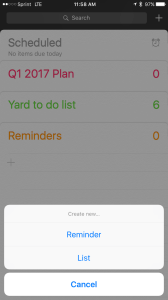
4. A new list will be displayed. You can edit the title of your list by clicking on the ‘New List’ text.
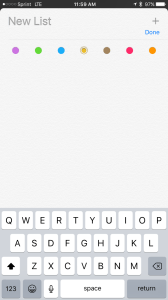
5. I have changed the title of this list. This will be my task list for the 2nd quarter of 2017. To add a new item to the list, select the ‘+’ located in the upper right hand corner of the screen.
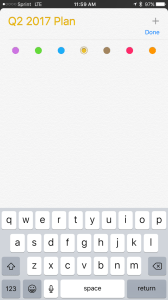
6. You can add additional items to your list by pressing on the ‘+’ sign that appears below the last item of your list.
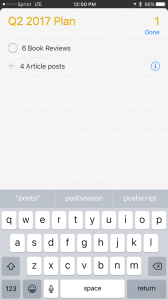
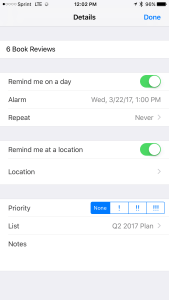
7. By selecting the information icon that appears on the right side of each line item, you are taken to a details screen that gives you options to set reminders, designate priorities, or add additional notes. These options give you more control of your list and more functionality than a traditional handwritten list.
The Apple Reminders App is definitely a powerful tool that fits inside the palm of your hand. Task lists are effective at actually recording goals or obligations so that they don’t just go unnoticed or forgotten. They literally give you constant “Reminders” about what tasks are important to complete in your entrepreneurial pursuits or for a more organized and efficient life. Hopefully this little guide helps!
 System Tinker